Multi-Color AMS Filament Purge Waste Cost Formula: 7 Proven Ways to Slash Flush Multipliers
Single-nozzle multi-color 3D printing systems—led by the Bambu Lab AMS, AMS Lite, Creality CFS, and Anycubic ACE Pro—have transformed desktop manufacturing, but they hide a brutal unit-economics trap for print farms and Etsy sellers. Every time a single-extruder printer switches filament colors on a layer, it must cut the active strand, retract it back to the hub, feed the new color, purge the molten transition zone down the chute ("filament poop"), and wipe nozzle ooze across a prime tower. On a 45-gram multi-color articulated model with 320 filament changes, default slicer settings routinely dump 140 grams of purged filament into the waste bin—resulting in a 311% purge-to-part waste ratio where the trash costs three times more than the finished product!
In this engineering cost guide, we derive the exact Multi-Color AMS Filament Purge Waste Cost Formula, work through a complete single-unit vs 12-unit build-plate amortization audit, and detail seven proven slicer optimizations documented in the Bambu Studio Filament Waste Reduction Wiki. To price your multi-color prints profitably before hitting slice, plug your model weight and swap count into the 3D Print Cost Estimator.
Executive Cost Takeaway: Why Single-Unit Multi-Color Prints Lose Money
- The Purge Mass Equation: Total waste \(W_{\text{purge}}\) depends solely on the number of color swaps (\(N_{\text{swaps}}\)) and flush volumes—not on how many copies of the model sit on the build plate.
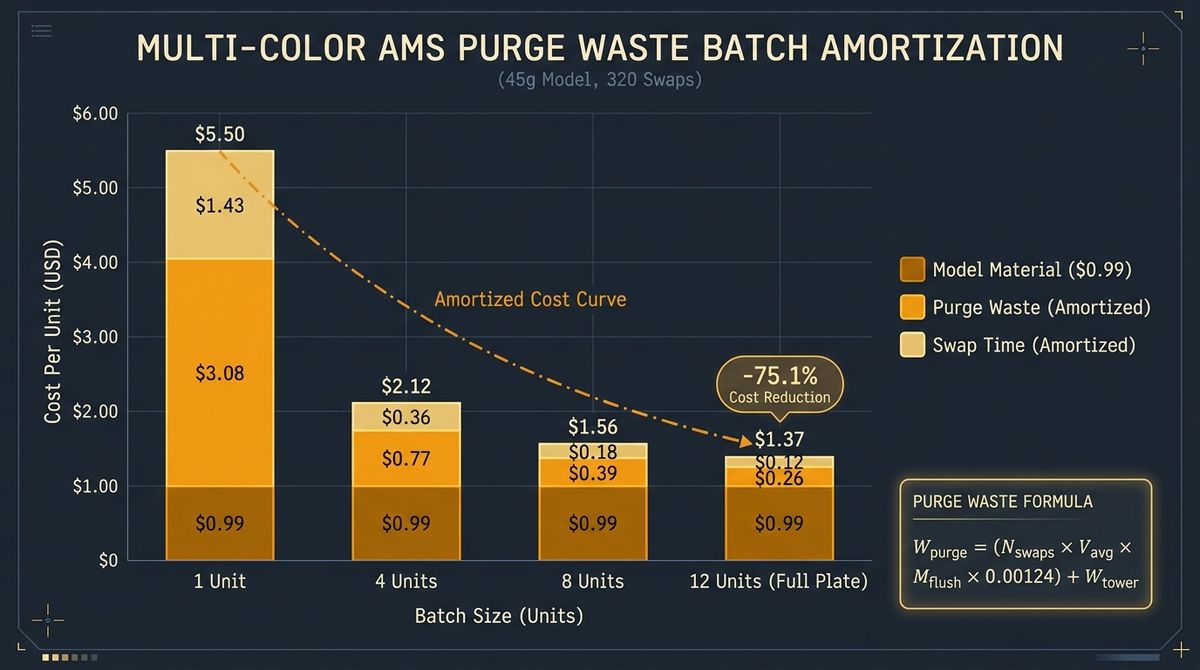
- The Full-Plate Amortization Rule: Printing 1 multi-color figurine on a plate costs $5.50/unit ($0.99 model filament + $3.08 purge waste + $1.43 swap time). Cloning 12 identical figurines onto the same build plate shares the exact same 140g of purge waste across all 12 units—dropping unit cost to $1.37/unit (-75.1% cost reduction)!
The Multi-Color AMS Filament Purge Waste Mass Formula (\(W_{\text{purge}}\))
When Bambu Studio or OrcaSlicer generates a flushing matrix, it calculates purge volume in cubic millimeters (\(\text{mm}^3\)) based on the pigment transition between the outgoing and incoming filaments (for example, purging black PLA into white PLA requires up to \(600\text{–}700\text{ mm}^3\), whereas purging white into black requires only \(140\text{–}180\text{ mm}^3\)).
To convert slicer flushing volumes into physical grams of wasted filament (\(W_{\text{purge}}\)) and dollar cost (\(C_{\text{purge}}\)), apply the volumetric density equation:
Where:
- \(N_{\text{swaps}}\) = Total number of filament changes across the print job.
- \(V_{\text{avg}}\) = Average unscaled flush volume per change in \(\text{mm}^3\) (typically \(260\text{ to }320\text{ mm}^3\) at default 1.00 multiplier).
- \(M_{\text{flush}}\) = Global Flushing Multiplier in Bambu Studio / OrcaSlicer (default = \(1.00\); tuned range = \(0.55\text{ to }0.70\)).
- \(\rho_{\text{filament}}\) = Filament density in \(\text{g/mm}^3\) (for standard PLA at \(1.24\text{ g/cm}^3\), \(\rho_{\text{PLA}} = 0.00124\text{ g/mm}^3\); for PETG, \(0.00127\text{ g/mm}^3\); for ABS, \(0.00104\text{ g/mm}^3\)).
- \(W_{\text{tower}}\) = Mass of the sacrificial Prime Tower in grams (typically \(18\text{g to }35\text{g}\)).
- \(W_{\text{infill-flushed}}\) = Mass of transition filament diverted into internal model infill or supports instead of the poop chute.
Step-by-Step Worked Cost Audit: 1 Unit vs 12 Units on One Build Plate
Now let us include the hidden killer of multi-color print farm profitability: AMS mechanical swap time (\(T_{\text{swap}}\)). Every filament cut, pull-back, load, heat-purge, and wipe adds approximately 85 to 105 seconds (average \(95\text{ seconds}\)) of non-printing machine time. Using the batch unit cost formula:
Let us run the exact numbers for a 45g 4-color PLA model requiring \(N_{\text{swaps}} = 320\) changes at a filament cost of $22.00/kg ($0.022/g) and a combined machine depreciation plus electricity rate of \(R_{\text{machine}} = \$0.17/\text{hr}\):
- Direct Model Filament Cost (\(C_{\text{model}}\)): \(45\text{ g} \times \$0.022/\text{g} = \mathbf{\$0.99\text{ per unit}}\).
- Default Purge Waste Mass (\(W_{\text{purge}}\) at \(M_{\text{flush}} = 1.00\)): With \(V_{\text{avg}} = 280\text{ mm}^3\) and \(\rho_{\text{PLA}} = 0.00124\text{ g/mm}^3\), chute waste is \(320 \times 280 \times 1.00 \times 0.00124 = 111.1\text{ g}\). Adding a \(28.9\text{ g}\) prime tower equals \(140.0\text{ g}\) of total waste.
- Purge Waste Dollar Cost (\(C_{\text{purge}}\)): \(140.0\text{ g} \times \$0.022/\text{g} = \mathbf{\$3.08\text{ per plate}}\).
- AMS Swap Time Overhead (\(C_{\text{swap\_time}}\)): \(320\text{ swaps} \times 95\text{ sec} = 30,400\text{ seconds} = \mathbf{8.44\text{ hours}}\) of pure filament-changing overhead! At $0.17/hr, that adds $1.43 per plate in machine/power cost.
- Single-Unit Print (\(B = 1\)): \(C_{\text{unit}}(1) = \$0.99 + \frac{\$3.08 + \$1.43}{1} = \mathbf{\$5.50\text{ per unit}}\) (82% of your cost is waste and swap overhead!).
- Full-Plate 12-Unit Batch (\(B = 12\)): \(C_{\text{unit}}(12) = \$0.99 + \frac{\$3.08 + \$1.43}{12} = \$0.99 + \$0.38 = \mathbf{\$1.37\text{ per unit}}\)—slashing unit production cost by 75.1%!
| Plate Batch Size (\(B\)) | Model Filament / Unit | Purge Waste / Unit (140g Shared) | Swap Time Cost / Unit (8.44h Shared) | Total Unit Cost (\(C_{\text{unit}}\)) |
|---|---|---|---|---|
| 1 Unit (Single Print) | $0.99 (45.0g) | $3.08 (140.0g waste!) | $1.43 (8.44 hrs/unit) | $5.50 / unit |
| 4 Units (Quarter Plate) | $0.99 (45.0g) | $0.77 (35.0g waste/unit) | $0.36 (2.11 hrs/unit) | $2.12 / unit (-61.5%) |
| 8 Units (Half Plate) | $0.99 (45.0g) | $0.39 (17.5g waste/unit) | $0.18 (1.06 hrs/unit) | $1.56 / unit (-71.6%) |
| 12 Units (Full Plate) | $0.99 (45.0g) | $0.26 (11.7g waste/unit) | $0.12 (0.70 hrs/unit) | $1.37 / unit (-75.1%) |
| 12 Units + Tuned 0.60x Flush | $0.99 (45.0g) | $0.15 (6.8g waste/unit) | $0.11 (0.64 hrs/unit) | $1.25 / unit (-77.3%) |
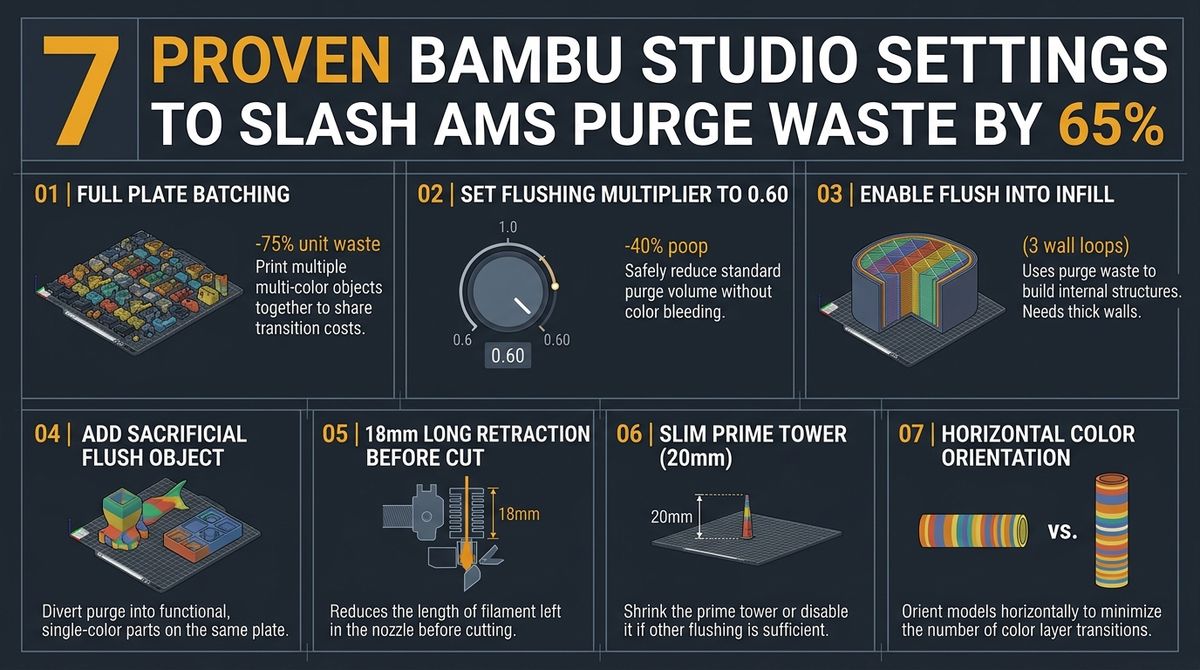
7 Proven Slicer Optimizations to Slash AMS Purge Waste by Up to 65%
- Lower the Global Flushing Multiplier to 0.60–0.65: Default slicer tables include a conservative safety margin. Dropping the multiplier from
1.00to0.60immediately cuts chute poop mass by 40% with zero color bleed on standard opaque PLA. - Enable "Flush into Objects' Infill": In Bambu Studio under Others → Flush Options, check Flush into objects' infill so color transitions are extruded inside hidden internal grid/gyroid cavities instead of down the chute ( avoid only when outer walls are translucent white or clear).
- Flush into a Sacrificial "Flush Object" (Fidget / Keychain): Place a functional utility item on the plate (such as a shop organizer bin, gridfinity box, or tie-dye keychain where random color bands don't matter), right-click it, and enable Flush into this object.
- Enable Long Retraction Before Cut (18mm Pullback): As documented in the Bambu Lab Purge Mode engineering notes, retracting 18mm of molten filament out of the melt zone before actuating the cutter blade reduces residual nozzle chamber volume by nearly 30%.
- Reduce Prime Tower Width and Volume: The prime tower exists purely to equalize nozzle pressure after a purge—not to flush pigment. Reduce Prime Tower width from 35mm to 20mm and set minimum prime volume to \(15\text{–}20\text{ mm}^3\).
- Orient Multi-Color Details Horizontally: Because swaps occur per Z-layer, rotating a model so a colored logo faces upward on the top 4 layers reduces color swaps from 250+ down to just 4–8 changes.
- Split Snap-Fit Eye and Trim Inserts by Object: Whenever possible, print solid-colored eyes or badges on a separate plate (or via "Print by Object" sequence) and press-fit them in 5 seconds—eliminating 100% of layer-by-layer AMS swaps.
Price Your Multi-Color Prints Profitably Before Hitting Slice
Stop losing margin to hidden AMS poop waste and 8-hour filament swap delays. Enter your model weight, flush grams, and batch count to calculate exact unit COGS and target Etsy/retail pricing.
Launch the 3D Print Cost Estimator →Step-by-Step Slicer & Calculator Verification Protocol
Before locking your production parameters, run a three-point verification check comparing your theoretical formula output against live slicer or register telemetry. Record the baseline metric, apply a single variable adjustment at a time, and log the resulting percentage improvement across a 10-unit or 7-day sample window.
Common Calculation Mistakes and Field Calibration Guardrails
The most frequent error operators make when applying this formula manually is mixing unit systems (such as combining millimeter volumes with gram densities without converting cubic centimeters, or mixing gross markup with net contribution margin). Always normalize all inputs to consistent base units before multiplying.
Frequently Asked Questions
Why is there both a prime tower and filament poop on Bambu Lab AMS prints?
The flushing chute ("poop") purges the old color out of the hotend melt zone while the toolhead is parked over the rear wiper. The prime tower then catches the final nozzle ooze and rebuilds steady internal extrusion pressure before the nozzle touches your outer model walls.
What is a safe Flushing Multiplier in Bambu Studio for PLA?
For standard opaque PLA and Matte PLA, a Flushing Multiplier between 0.60 and 0.65 prevents color bleed on 95% of transitions. If transitioning from pitch black or saturated red directly into pure white, manually bump that single cell in the matrix to 0.85–1.00 while keeping all other cells at 0.60.
Does "Flush into Infill" show through light-colored outer walls?
If your outer model shell is white, yellow, or translucent and uses only 2 wall loops, dark black infill purged right behind the perimeter can cast a faint shadow. Increase Wall Loops to 3 when using Flush into Infill on light exterior colors.