5 Catastrophic Mistakes When You Calculate True 3D Print Cost for Profit
Running a 3D print farm or a small Etsy shop feels like a license to print money until you actually look at your net margins. Most makers simply weigh their finished model, multiply it by the cost of their PLA spool, and slap a random markup on top. If this is how you calculate true 3d print cost, you are mathematically guaranteeing your own bankruptcy.
The hidden expenses of additive manufacturing quietly eat away at your profits while your machines are running. From the peak wattage draw of heating up a 300x300mm build plate to the physical degradation of your brass nozzles and PTFE tubing, every single print carries a complex overhead debt. To survive in a competitive market, you must transition from guessing your prices to engineering them.
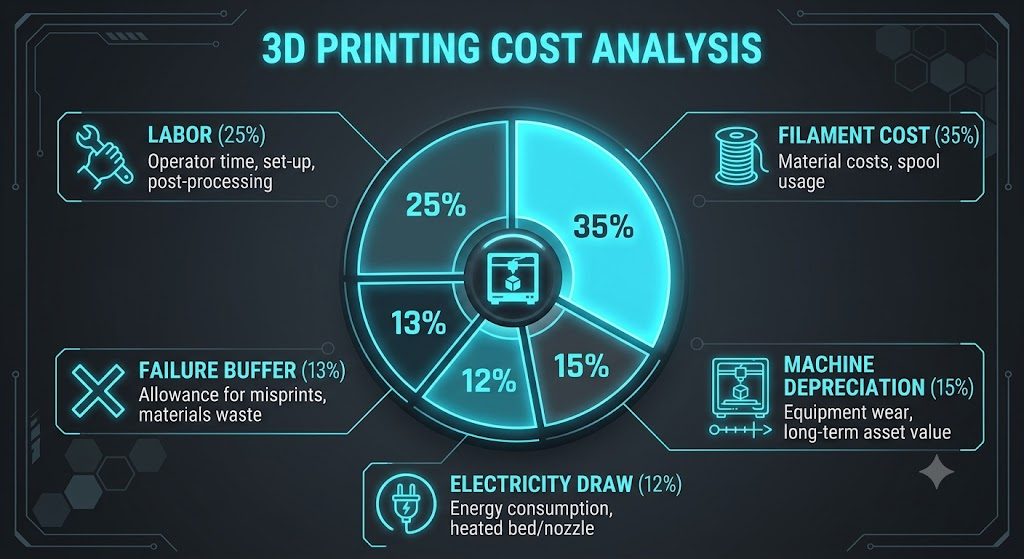
Quick Answer / Key Takeaways * Relying solely on filament weight ignores up to 40% of your actual operational costs. * Electricity consumption fluctuates wildly; a heated bed drawing 350W during the first layer drops to 150W later, heavily impacting long prints. * Machine depreciation and failed print ratios must be baked into the base cost of every successful unit you sell.
Why You Must Calculate True 3D Print Cost Beyond Slicer Estimates
Your slicer software is an incredible tool for estimating time and material volume, but it is a terrible financial advisor. While Cura or PrusaSlicer can tell you exactly how many grams of filament a model requires, they operate in a vacuum. They do not know your local utility rates, the lifespan of your specific stepper motors, or the ambient temperature of your room which forces the heated bed to work harder.
When you fail to calculate true 3d print cost holistically, scaling up your operations actually accelerates your financial losses. Selling a 12-hour print for $15 might seem profitable if the plastic only cost $3. However, once you factor in the machine-hour rate, thermal overhead, and manual post-processing, you might be working for pennies per hour.
5 Catastrophic Cost Calculation Mistakes
If you want to protect your profit margins, you must immediately eliminate these five common pricing errors from your workflow.
1. Ignoring Peak vs. Average Electrical Wattage
Many makers assume their 500W power supply is constantly drawing 500 watts, or conversely, they ignore electricity entirely. In reality, a printer drawing 350W to heat the bed to 80°C and the nozzle to 240°C for PETG will settle to around 150W during active printing. You must calculate the exact kilowatt-hour (kWh) cost based on your local utility rates for the entire duration of the print.
2. Omitting Hardware Depreciation
3D printers are mechanical beasts that tear themselves apart over time. If your $800 machine has an expected lifespan of 4,000 printing hours, you must add a $0.20 depreciation fee to every single hour that machine runs. Failing to do this means you will have no capital saved to replace the machine when the mainboard fries or the V-slot wheels disintegrate.
3. Pretending You Have a 0% Failure Rate
Even the most perfectly tuned Voron or Bambu Lab machine will occasionally produce a spaghetti monster. According to 3D Hubs' annual manufacturing report, commercial FDM printing naturally incurs a 5% to 8% failure rate. You must inflate your base cost per part by your historical failure rate to ensure your successful prints subsidize the wasted plastic.
4. Valuing Your Post-Processing Labor at Zero
Removing supports, sanding layer lines, and installing threaded brass inserts takes valuable human time. If your target labor rate is $25 per hour, and a print requires 15 minutes of manual cleanup, that is $6.25 that must be added to the raw cost of the item. Never donate your labor for free.
5. Miscalculating Slicer Time vs. Real-World Time
Slicers consistently underestimate the time required to heat the bed, perform auto-bed leveling (ABL), and run purge lines. A print estimated at 4 hours in the slicer might tie up your machine for 4.5 hours in reality. You must bill your machine-time rate based on the actual time the printer is unavailable for the next job.
The Financial Impact of Volumetric Flow Rates
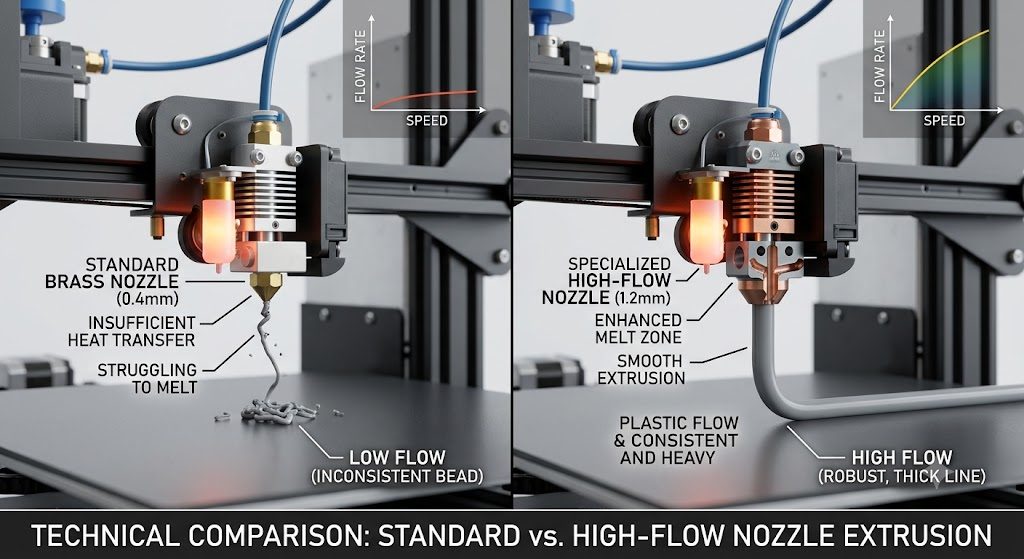
One of the most advanced ways to lower your true cost is to optimize your volumetric flow rate (measured in mm³/s). If your hotend can safely melt and extrude 15 mm³/s instead of the default 8 mm³/s, you can drastically reduce your print time. Less print time means less electricity consumed and lower machine depreciation per unit.
Upgrading to a high-flow CHT nozzle or a more powerful heater cartridge requires a small upfront investment but pays massive dividends at scale. When you print faster without sacrificing quality, your machine-hour rate plummets. This gives you the flexibility to either undercut competitors or pocket a significantly higher margin.
For detailed troubleshooting on common 3D printing failures and cost-saving fixes, visit 3D Error Fix for technical guidance on maintaining profitability and print quality.
Your Bulletproof 3D Print Costing Checklist
Stop guessing and start tracking. Implement this strict protocol before pricing your next batch of 3D printed products.
- Establish your exact kWh cost: Check your latest electrical bill and note your localized energy rate.
- Determine your machine's hourly rate: Divide the total cost of the printer by its expected lifespan in hours.
- Track your manual labor: Time yourself removing supports on a prototype and multiply that by your target hourly wage.
- Calculate your exact true cost: Use our 3D Print Cost Estimator to automatically combine material, electricity, labor, and depreciation into one perfect price tag.
If you are struggling with failed prints driving up your costs, you need to diagnose the root cause immediately. Thermal runaway, nozzle clogs, and bed adhesion issues are common culprits. Address these systematically to keep your machines running safely and profitably.